NemoXCompanion is an ESAPI Plugin for Varian Eclipse TPS which interface with NemoX app for Monitor Units verification.
Current version is NemoXCompanion v.1.5.0.0 for Eclipse version 13.5. If you are interested in NemoXCompanion please ask the author.
NemoXCompanion v.1.6.5.0 is the version for Eclipse version 18.
IMPORTANT: please refer to Plugins Home for information about usage, LICENSE and AgolabsPreferences.txt text file.
Overview
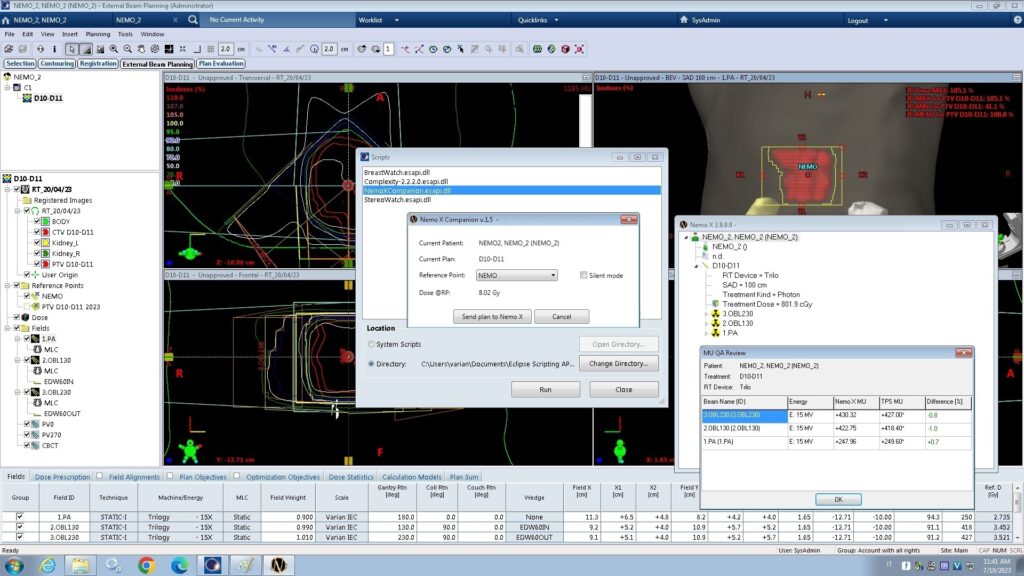
NemoXCompanion allows to interface the Eclipse TPS with Agolabs Nemo X app. This makes comparison of Monitor Units (MUs) between Eclipse and Nemo X just a click.
Currently only 3D Plans (no Plan Sums) are supported.
IMPORTANT: NemoXCompanion requires Nemo X v.2.9 and above.
Nemo X should be previously committed for all the beams/linacs used for MUs comparison. A simple matching-rule text file is included in Nemo X v.2.9 and above to automatically translate Eclipse linacs name to Nemo X linacs name: please edit this file to reflect the naming of your linacs in Eclipse and Nemo X.
IMPORTANT: in AgolabsPreferences.txt ([NEMOXCOMPANION] section) put in the ExportPath tag the path of the Nemo X application. NemoXCompanion will create an exchange data file in ExportPath/Companion/Clients/Your-Eclipse-workstation-name. This makes it possible to use NemoXCompanion in networks with multiple Eclipse workstations.
How it works
- Run Nemo X app and leave it running in the background. Please note that Nemo X should run on the same workstation on which you’re going to use Eclipse.
- In Eclipse, open/create an External Beam Plan. Calculate dose and prescribe to have valid MUs in the Plan. Create a Physical Dose Point and position it on the 100% isodose or just next to it (e.g. the isocenter). This Dose Point will be the point at which Nemo X app will calculate dose and the MUs for the beams.
- Launch NemoXCompanion plugin.
- NemoXCompanion window opens. Select the Dose Point used for the calculation. Look at the dose in the Dose Point: this should be equal or near to the prescribed dose per fraction in your Plan.
- Click on “Send” button (this will create an exchange data file as detailed above).
- Switch to Nemo X app and press the F4 key.
- Nemo X automatically will load all the beam data sent by Eclipse and will calculate with his independent dose engine the MUs for each beam.
- Look at the percentage differences between Eclipse MUs and Nemo X MUs. In the comparison window percentage differences are rendered in green if within 5%, in red if above 5%.
Eclipse plans:
- 3D Plans OK
- IMRT Plans NO
- VMAT Plans NO
- Plan Sums NO
- Dose Plans NO